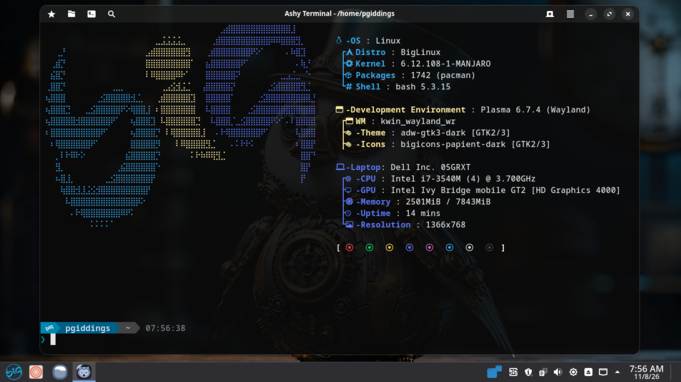
From GNOME OS to BigLinux: A Two-Day Switch
A couple of days ago I wrote about installing GNOME OS on my main machine. I came away impressed by how far the reference GNOME experience has come — and also quietly frustrated by what GNOME OS is, and what it isn’t. That frustration eventually won, and this weekend I wiped it and put BigLinux on instead. Here’s the honest follow-up.
Why I left GNOME OS
Let me be fair first: GNOME OS is doing exactly what it’s designed to do. It’s a testing and development platform for GNOME itself, not really a curated desktop distro. My problem was that I was treating it as a daily driver, and the cracks showed:
- Updates occasionally broke my session, which is fine when you’re testing GNOME; less fine when you’re on a deadline.
- The package ecosystem is limited compared to a mainstream distro, and I kept fighting the system to install things any Ubuntu or Fedora user would take for granted.
- There’s no real “it just works” layer — no curated codecs, driver handling, or opinionated defaults beyond GNOME itself.
None of this is a bug. It’s a lab bench. I wanted a lab-grade GNOME experience; what I actually wanted was a polished desktop that happens to run GNOME well. So I went shopping — and in the end I did something slightly ironic: I picked a distro whose headline desktop is KDE Plasma, not GNOME.
Enter BigLinux
BigLinux has been around since 2004 — a Brazilian project that’s gone through several reinventions (Kubuntu, deepin, and nowadays an Arch/Manjaro base with KDE Plasma as the flagship). It ranks surprisingly high on DistroWatch’s popularity chart for a distro many people outside South America have never heard of, and the recent builds have gotten a lot of attention for being beginner-friendly without dumbing anything down.
Why a KDE distro after a GNOME-only experiment? Honestly: because what I missed wasn’t GNOME-the-desktop, it was distro-polish — an installer that gets out of the way, sane defaults, working drivers, and a system that feels maintained by someone who cares whether it boots tomorrow.
The install
The Calamares installer is as painless as they come. It happily took over the whole disk (goodbye, GNOME OS — no hard feelings), offered guided partitioning including Btrfs, and was done in minutes. First boot landed me in a tastefully customized Plasma setup that doesn’t feel like someone’s DeviantArt theme from 2010 — it’s coherent, and everything about it signals “we thought about this.”
Things that stood out in the first hour:
- Kernel and driver management is exposed in a friendly way — swapping kernels is a menu action, not a rite of passage.
- Out-of-the-box media handling, and a stack of lightweight web-app shortcuts for common services (Netflix, Discord, various music and email clients) that occupy almost no disk space but fill the gaps nicely.
- Btrfs snapshots wired in from the start, so a bad update is a reboot away from being undone — something I sorely missed on GNOME OS.
- Gaming setup with Proton integration handled sensibly, which mattered to me more than I expected it to.
Where I am now
Two hours in: everything I do daily works, updates have been uneventful, and the combination of snapshot safety nets and easy kernel switching means the failure modes that pushed me off GNOME OS mostly can’t ruin my day here.
The caveats worth stating plainly, because the hype videos won’t: BigLinux sits on Arch/Manjaro, so you inherit that ecosystem’s trade-offs — a rolling-ish base that values freshness and the occasional hiccup that comes with it, plus slightly heavier system requirements than a minimal Arch install. The customization layer is thick, which some will love and purists will find busy. And historically, keeping a curated experience across multiple desktop variants has been a work in progress for this project — worth checking which edition suits you before committing.
Verdict
GNOME OS is a great question (“what does the purest GNOME look like?”) but it was the wrong answer for my desk. BigLinux is a better answer to a different question (“what’s a polished Linux desktop that I never have to think about?”), and right now that’s the question I care about. If I ever miss stock GNOME, I can run it inside this system anyway.
Next post, probably: how the snapshot-and-rollback workflow behaves when an update actually goes wrong — assuming I ever get unlucky enough to test it.