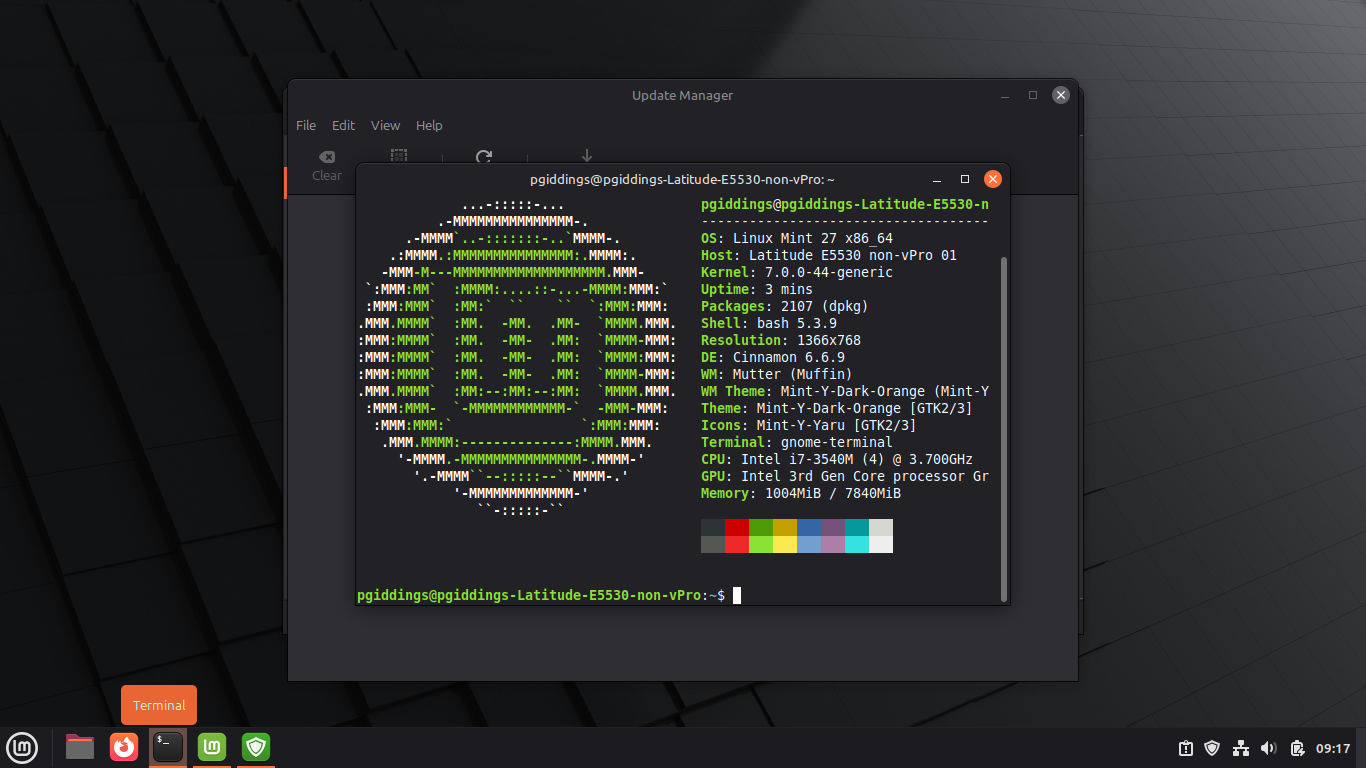
From Zena to Adrien: Taking an Aging Dell Latitude E5530 to Linux Mint 27 (the Hard Way)
A story about installing Linux Mint 22.3 “Zena”, then jumping the release queue to Mint 27 “Adrien” on a twelve-year-old laptop — and everything you should know before trying it yourself.
There’s a particular pleasure in reviving an old corporate workhorse. The Dell Latitude E5530 shipped around 2012 with a third-generation Intel Core processor (Ivy Bridge) and Intel HD 4000 graphics — hardware that Windows 11 won’t even look at, but which Linux treats with quiet respect. Pair it with Linux Mint’s Cinnamon desktop and you get a machine that feels far newer than its passport suggests.
This article walks through two journeys in one: first, a clean install of Linux Mint 22.3 “Zena”, the newest stable point release of the 22.x series; and second, the premature — and, to be clear, unsupported — leap to Linux Mint 27 “Adrien” by hand-editing the package repositories. Along the way, we’ll separate what’s officially confirmed from what’s community folklore, because in late 2026 that distinction matters a lot.
Part 1: Installing Linux Mint 22.3 “Zena”
Why 22.3?
Linux Mint 22.3 landed in early January 2026, and it’s a polished point release on the Ubuntu 24.04 LTS base with Cinnamon 6.6 and a 6.14-series kernel. Highlights include:
- A substantially revamped Mint Menu applet in Cinnamon — same three-column layout, but with a full-height sidebar, user avatar, symbolic category icons and app descriptions.
- Brand-new System Information and System Administration tools.
- Improvements across Nemo, Timeshift (pausable snapshots), per-app notification indicators, and an always-on Night Light.
For an E5530 specifically, 22.3 is the sweet spot of the 22.x line: the Ubuntu 24.04 base gets security updates for years, and the 6.14 HWE kernel handles Ivy Bridge chips without drama.
The install itself
- Download the Cinnamon edition ISO from linuxmint.com and verify its SHA256 checksum.
- Write the USB stick with Rufus, balenaEtcher or Ventoy. Any 4 GB+ drive works.
- Boot the E5530 via the F12 one-time boot menu. If the installer hangs or the screen glitches during boot, add
nomodesetat the GRUB prompt — a classic Ivy Bridge trick that’s rarely needed anymore, but good to know. - Install using the graphical installer: choose “Erase disk” on a machine you don’t care about, or set up your own partitioning. The installer asks almost nothing else — user name, password, timezone, done.
- First boot housekeeping: open the Update Manager, let it pick a local mirror, apply updates, then install the microcode (
intel-microcode), and run the Driver Manager to confirm everything’s happy.
At this point you have a perfectly supported, boring-in-the-best-way Mint 22.3 system. You could stop here. But of course, we don’t stop here.
Part 2: The Lure of Adrien
What Mint 27 actually is
Here’s where honesty matters. As of late November 2026, Linux Mint 27 “Adrien” has not officially shipped yet. The Mint team has confirmed (through their monthly news posts) that:
- Version 27 carries the codename “Adrien” — the first release under a new naming convention of men’s names in alphabetical order.
- It’s based on Ubuntu 26.04 LTS “Resolute Raccoon”, released by Canonical in April 2026, supported into 2031.
- It ships Cinnamon 6.8, a Linux 7.0-series kernel, and editions for Cinnamon, Xfce and MATE.
- Mint has moved to a yearly release cadence with no point releases, starting with 27 — hence the version-number jump.
- The target is Christmas 2026, though Mint has not stated an exact day.
Because 22.x sits on Ubuntu 24.04, going to 27 means jumping an entire LTS generation in the package base — a far bigger move than any 22.x point update. The official upgrade path from 22.3 will exist once the release lands, delivered through the familiar Update Manager flow. It does not exist today.
The unsupported route: editing the repositories yourself
Impatient testers on r/linuxmint have been doing what impatient testers always do: hand-editing the repository files to pull the pre-release packages. The mechanics, as documented in one widely-shared trip report, are:
- Back up first. Take a Timeshift snapshot. Non-negotiable. If you skip this and something breaks, you own both halves.
- Edit
/etc/apt/sources.list.d/official-package-repositories.listand replacezenawithadrien(the Mint 27 codename). - In the same file, replace
noblewithresolute(the Ubuntu 26.04 base codename). - Run
sudo apt update && sudo apt full-upgrade, resolve what it throws at you, and reboot.
What that actually looks like on real hardware
The honest title of the community report says it all: “In 16 hours of…” — the ellipsis being the polite part. Moving one full LTS generation via raw APT means:
- Thousands of packages changing at once, with dependency resolutions that the (not-yet-released) official migration tool would normally shepherd.
- Third-party PPAs and repos pinned to
noblethat will hold everything back or fail outright until you retarget or remove them. - Flatpaks, kernel updates and bootloader refreshes needing attention mid-flight.
- A genuine risk of ending up with a franken-system that boots into neither world cleanly.
This is fine — arguably even fun — on a spare machine or a laptop you’d reinstall from scratch anyway. Which is precisely what a 2012 Latitude is. The E5530 is the ideal crash-test dummy: cheap, well-documented, beloved by the Linux community, and impossible to truly brick if you keep a live USB handy.
A calmer alternative
If you want Adrien without the adrenaline: wait for the official release and upgrade through Update Manager → Edit → “Upgrade to Linux Mint 27”, exactly as 22.2 “Zara” users did for 22.3. That path exists for a reason, and the Mint team has a long track record of making it uneventful. Until then, Mint 22.3 is fully supported and will remain a solid home for the E5530 regardless.
Part 3: Life on the old Latitude afterwards
Whichever route you take, the E5530 specifics are worth noting:
- Graphics: Intel HD 4000 is handled by the standard Mesa drivers; no proprietary anything required. Cinnamon composites smoothly at the panel’s native 1366×768 (or 1920×1080 on the higher-res panel option).
- Wireless: Depending on the configuration, the Broadcom or Intel mini-PCIe card may want firmware from the repos — install firmware packages before you disconnect Ethernet.
- RAM: The two SO-DIMM slots take up to 16 GB; 8 GB is comfortable for Cinnamon, and a cheap SSD swap (if the machine still has a spinning disk) transforms it more than any distro choice will.
- Battery: Ancient batteries lie to the kernel. If suspend misbehaves, test with the power adapter before blaming the kernel upgrade.
The takeaway
Installing Mint 22.3 “Zena” on a Dell Latitude E5530 is a genuinely satisfying, five-star experience: quick, polished, and a perfect fit for decade-old hardware. Jumping to Mint 27 “Adrien” early by rewriting zena → adrien and noble → resolute in your repository list is the hacker’s version of the same story — educational, occasionally glorious, and about sixteen hours of your life you’ll narrate on Reddit either way.
If this article convinces you of one thing, let it be this: take the Timeshift snapshot before you touch that file. Future-you, staring at a GRUB rescue prompt at 2 a.m., will be grateful.
Sources and further reading: Linux Mint 22.3 “Zena” release coverage (9to5Linux, OMG! Ubuntu, Phoronix), the Mint team’s monthly news reports on Mint 27’s Ubuntu 26.04 base and yearly cadence (ComputingForGeeks summary, September–October 2026 news), and community upgrade experiences on r/linuxmint (November 2026). Repository paths and codename substitutions come from first-hand upgrade reports; verify everything against linuxmint.com before touching your own system.
Leave a Reply